Thursday, 15 April 2010

I Love Digi Challenge #5 ~ Sketch

It's time for Challenge 5 at I LOVE DIGI and it's a sketch!


Here's my take on it. I've used a Bugaboo Gus image and sentiment with an Old Olive (SU) and Brown colour combo which is a fave of mine:


So why not hop on over to the challenge blog and join in? This week we are sponsored by The Stamping Boutique - details on the blog.

Wednesday, 14 April 2010

Bugaboo's Wednesday Tutorial

Today is a day of first's! I start my new job today as an Outdoor Instructor. I haven't finished my course yet but am able to work around both which is great. It's also my turn to host the Bugaboo Tutorial this week! So what have I got for you? Well...

Are you fed up of having to cut out around images with all the fiddly bits? Well with Digi Images, there's no need. It is possible to put them straight onto some digi papers before printing. I'm going to show you how to create perfectly sized topper which will also save you ink as you will no longer need to print out entire sheets of papers.

So this is how I use Microsoft Publisher in my card making.

Firstly open up a blank page in Publisher:


From the task bar at the top, follow the path TABLE; INSERT; TABLE, and this menu should appear:


Change the number of ROWS to 1 and the number of COLUMNS to 1. Click OK and you should go back to your original page with a long slim rectangle. Move the rectangle up to the upper, right hand corner and use the rulers to adjust it to the size you want. For this tutorial I went for 10cm by 10cm to create a small square topper:


Now it’s time to fill the cell. Click on the cell to select it then RIGHT CLICK. Choose FORMAT TABLE and this dialogue box should appear:


You can use any of these options to fill the cell but I’m going to show you how I use digi papers. Choose the PICTURE option and it will take you to here:


Click on SELECT PICTURE and find the digi paper you want to use from the folders on your computer. I’m using a purple swirl paper from Pink Petticoat. The paper you’ve chosen will appear in the middle of the dialogue box. IMPORTANT, you must now click on the LOCK ASPECT RATIO box otherwise your digi paper will be squashed or stretched to fill your cell. Click OK:


And there we have it, one box of digi paper (no longer a need to print a whole page):


To layer on the Bugaboo image, follow the pathway INSERT; PICTURE; FROM FILE and choose the picture you want (I've gone with the Mad Hatter as I think it goes well with the swirls). Make sure you choose the PNG version. Move it to where you'd like it. In the pic below, I have shown you both versions (PNG on the left, JPG on the right). As you can see the JPG version has a white box surrounding it.
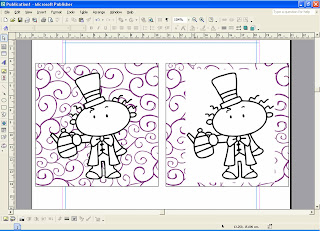


Now simply print, colour and add to your card.


*    *    *    *    *    *    *

Layering Images

A few of my latest projects have involved layering images. Here's how I did it.

Again I opened Microsoft Publisher with a blank page. I inserted my PNG version of the Bee Bug Jar first as this is the image I want furthest back:


Next I inserted my Boy Bee image:


I then, simply shrunk him and moved him onto the jar. If you drag over both images, they both become selected and a small box will appear (you can just about see it in the pic):


If you click on this button, it will group the object into one and so you can treat it as a single image from now on. If you want to keep the aspect ratio the same then use the corner resizers whilst holding down SHIFT. What I really like about Publisher is the rulers on the sides. They are so useful for getting things the size I want.

Hope you liked the tutorial and found it useful. Feel free to ask any questions and I'll try to answer them (if I can!). If anyone would like some instructions for how to do this in Word, I have some I can e-mail to you. Just drop me a line and I'll do so.

Tuesday, 13 April 2010

Bugaboo New Release

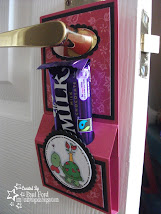
It's Tuesday and you know what that means! It's NEW RELEASE DAY at Bugaboo. This week sees Morning Margaret and Flower Bears sets being added to the collection. Here's one of the Margaret images available.

You can also now buy these images as bundles and save money - how awesome is that. Why not visit the Catch The Bug Blog for more inspiration from the rest of the Design Team.

Sunday, 11 April 2010

Charisma Cards #14 ~ Thank You

I really do like these new Bugaboo Brat Bugs - they are awesome. I've been playing with layering images as the Bugaboo ones come with transparent backgrounds which makes building scenes easy. I've used a CC Design Digi for the bench and the Bee Boy and Bee Jar are from Bugaboo.

This card was made for the Charisma Cards Challenge where the theme is THANK YOU.


If you like these images as much as I do, then make sure you take part in our Blog Hop that we have going on now.  It is a fantastic hop with amazing creations and the first chance to see the whole design team together. There are tons of chances to win free images too. Everything is so full of bugs there right now. Why not check my original post HERE or simply head on straight over to the CATCH THE BUG Blog to start the hop.

A Spoon Full of Sugar

Do you remember the other day, I made a card using the BUGABOO Superhero image? I loved it so much that when I saw the theme at A Spoon Full of Sugar was One for The Boys (something Male inspired) I decided to make a matching gift box. I obviously used the same image and colours so that they are completely co-ordinated. 


I used my Shaker Box die from Sizzix to make it. Below is a pic of both projects together.


If you like Bugaboo images and would like to get some then visit the shop HERE or visit the Challenge blog 'Catch The Bug' to participate in our challenge and blog hop to win some. There's even a chance to win an image on my blog by commenting in THIS post.

Just Cute Bears #12 ~ Flowers

This week's challenge at Just Cute Bears is FLOWERS. I've used the Butterfly Bear from Bugaboo and Digi papers from Pink Petticoat to create this card. I've been in a simple square matt and layer mood over the past couple of days (think it was when I did my Superhero card the other day that triggered the fad)


Also, have you been Blog Hopping with us at Bugaboo yet? It is a fantastic hop with amazing creations and the first chance to see the whole design team together. There are tons of chances to win free images too. Why not check my original post HERE or simply head on straight over to the CATCH THE BUG Blog to start the hop.

Saturday, 10 April 2010

Catch The Bug Challenge and Blog Hop

If you are on the Catch the Bug Blog Hop then you should have arrived here from JENNY'S BLOG. I thought her Butterfly Bear was lovely and matched that floral backing paper nicely. If you are not on the hop, then why not head over to the CATCH THE BUG challenge to begin it. There's so any wonderful ideas and inspiration throughout and well worth a look.

During the hop, each of the Design Team are showing their work for our latest challenge (the first challenge with the entire team) which is to include a BUG on your project. It can be an image with a bug or a bug embellishment, buggy papers - anything as long as there is a BUG.  I've used this cute Jesse Bear Bug Jar image for mine. I've used an Elzybells Stamp which matches perfectly. The cardstock and paper are from SU.


The inside card has a panel with this week's Bug in a Jar Friday Freebie on it. Have you downloaded this one yet. If not, why not? It's free and you can use it to enter this week's challenge. Head on over to the Bugaboo Shop now to get it.


Now, for those of you collecting the letters from the hop to work out the secret phrase, then I'm sorry, I don't have one, you'll have to keep looking! But please leave a comment as I will be choosing a random winner from all those who comment here to win a Bugaboo Image of their choice. So, seeing as I let you down with having no letter, how about I give you a look at the NEW COLLECTION Jodie has just released in the shop! She has created a new set of BUGABOO BRAT BUGS and they are awesome and fit this challenge theme perfectly. Here's the Caterpillar Brat:


For all the details regarding the Challenge and the Hop, visit the challenge blog at:


So, where are you going next? Well, you need to head on over to see SANDY. Enjoy the rest of the trip!

Secret Crafter Saturday Challenge - Get Well Soon

The theme this week at Secret Crafter is Get Well. I made this little shaker box using one of the new Bugaboo Brat Bug images which are awesome.


the challenge details say that it should be something to 'cheer up a poorly' and I think the box itself could but also you could fill it with something they'd like too.


I've changed up my doodling a bit and used crosses instead of my usual dots! I really like the bright pink and brown combo too.

Friday, 9 April 2010

Friday Freebie at Bugaboo

Check out one of this week's Friday Freebies at Bugaboo. This is a sneak peek of a project I have ready for our new Challenge tomorrow. And believe you me, you won't want to miss a thing tomorrow.
Not only will the challenge be announced (and you can enter to win some Bugaboo Images) but there's a blog hop (where you can win more images) and a competition (where you can win some images!). To coincide with the Challenge theme, there'll be a new release too! We, as the design team, haven't seen all the images yet but the sneak peek I have seen is quite exciting - SO MAKE SURE YOU COME BACK TOMORROW FOR ALL THE NEWS AND DETAILS

Thursday, 8 April 2010

Oldie But Goody Thursday and Digital Tuesday

Today is Oldie But Goody Thursday at Catch The Bug where the DT members show projects made using past releases. It's so easy to get caught up with the latest craze and newest images so it's really nice to look back at the rest of the collections as there are so many to see.

Last night I finished off some ATCs for this month's Addicted To Atcs swap. The theme for April is April Showers


And here's a card I made last night for the Digital Tuesday Challenge. This week's theme is 'Blue and White and 1 other'. It's obvious I chose red to create this awesome Bugaboo Superhero card. I really really like this card. It's clean and simple but the image is just so good that it speaks for itself.


I do like the colours on this project. Don't think I've ever put red and bright blue together before but it works on this.

Monday, 5 April 2010

Kaboodle #28

The latest Kaboodle Challenge, to use a 'digi girl' is timed perfectly as I needed to make a card for my friend Sue. I affectinately call her Suzy Snowflake (has a long story behind it) and so I used BUGABOO's JJ image rom the Christmas range.


I think I have included enough 'snowflakes' as I also used a Pink Petticoat backing paper. Can you guess what Sue's favourite colours are? Yep, Pink and Black. Such a personalised card and so I hope she likes it.

Sunday, 4 April 2010

Angel Bear

I've just come back from a busy weekend of Salsa and jumped straight back into things by making this little project for 3 Challenges. I made a similar book when I joined the Bugaboo DT and it is so useful that I thought I'd make another one.


This Angel Bear was a new release last week and is one of a set. Head on over to Bugaboo to check them out.


This book fits these 3 Challenges:
Charisma Cardz - Animal Magic (use an animal)
Just Cute Bears - Colour Combo of Green and Yellow (and obviously to use a bear)
Totally Papercrafts - Let's Go Digital (digi image from BUGABOO)

Saturday, 3 April 2010

Easter Treat

How about this for an Easter treat.
Jodie at Bugaboo is offering this mini set of Bunny Blocks for free over on her blog.
I'm sure they can be used for other occasions too and not just Easter.


Cub Easter Cards

I can't take the credit for these cards. They were in fact created by my Cub Scouts. I printed out the Bugaboo Bunny onto some plain white card and let them loose.


I thought they'd all end up samey but they all tackled it differently and came up with a variety of cards.
I used a different version of the Bunny on the back of the cards for the 'Made by...' label.


This is a scheduled post right now as I'm away for a couple of days in Bristol for a bit of Salsa Dancing!!!
Hope you are all enjoying your Easter Bank Holiday too.

Friday, 2 April 2010

Cards For Men # 7


The theme this week at Cards For Men is HUMOUR. How much more perfect can you get than Gus from Bugaboo. Not only do you get the image but the sentiment too!

I got the green backing paper in a WHSmith bargain bin - 12 assorted sheets for 99p. The circular blue paper I used on the Superhero Card (posted earlier) was from the same pack. Unusually for me, this is my 3rd post of the day so make sure you check my other updates too.